Supported Modes
Camera gimbals aka camera mounts can be controlled in at least six different ways. This page provides an overview of these controls and their setup.
The gimbal’s “mode” defines how it is controlled.
Each ground station (GCS) is different but Mission Planner, for example, has a “Set Mount” button that allows changing the mode. In many cases the user does not need to directly set the mode, instead this is done automatically as part of responding to a command from the user.
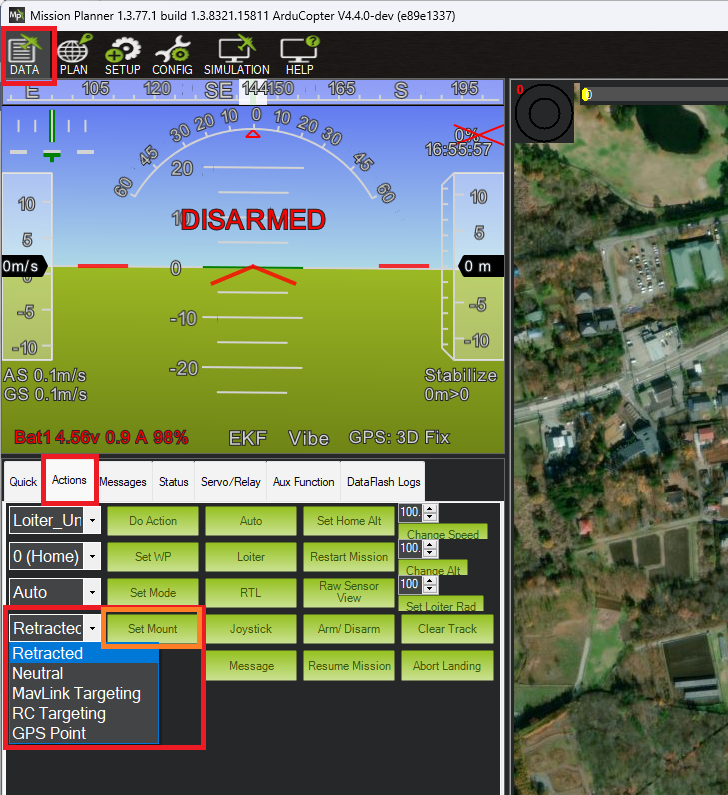
- Retract Mode: The gimbal will move to the roll, pitch, and yaw angles held in the following parameters:
MNT1_RETRACT_X
MNT1_RETRACT_Y
MNT1_RETRACT_Z
Gremsy gimbals will immediately stop stabilizing and wont be able to power on without rebooting.
- Neutral Mode: The gimbal will move to the roll, pitch and yaw angles held in the following parameters respectively:
MNT1_NEUTRAL_X
MNT1_NEUTRAL_Y
MNT1_NEUTRAL_Z
-
MAVLink Targeting: The gimbal will move according to real-time commands received from the ground stations, companion computers or other MAVLink command source, and/or Auto mode mission commands
-
RC Targeting: The pilot controls the gimbal in real-time using the RC transmitter.
-
GPS Point: Same as MAVLink targeting, but the gimbal points at a specific location. Users never need to actively set the gimbal to this mode.
-
SysId Target: The gimbal points at another vehicle using the MAVLink system id specified. Users never need to actively set the gimbal to this mode. There are no known GCSs that support setting the system id, but the parameter can be set by updating the value of the MNT1_SYSID_DFLT directly.
-
Home Location: The gimbal points at the home location (normally its takeoff location).